Glowing Paws: Seamless Vector Patterns for Real Projects
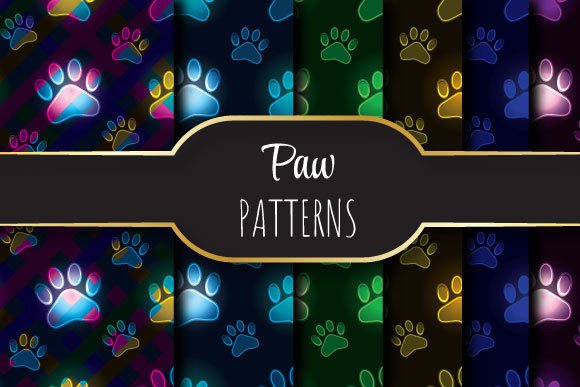
When you need a background that feels alive—not just decorative—but purpose-built for clarity, consistency, and visual impact, Glowing Paws delivers something uncommon: a set of seamlessly repeating vector patterns designed with precision, not just aesthetics. Each pattern is crafted to tile flawlessly across any surface without visible seams, distortion, or pixelation—whether printed on stationery, layered into a presentation slide, or scaled across a website banner.
Why Seamless Repeating Patterns Matter More Than You Think
A seamless pattern isn’t just about convenience—it’s about credibility. Imagine designing a branded newsletter template. If your background repeats with a visible seam every 12 inches, readers subconsciously register inconsistency—even if they can’t name why. That tiny break in continuity weakens professionalism. Glowing Paws eliminates that risk. Its vector-based construction ensures infinite scalability, while the deliberate 12 × 12 inch (3600 × 3600 pixel, 300 dpi) canvas gives you ample room to crop, rotate, or layer without compromising resolution—especially critical for high-end print applications like business cards, packaging mockups, or exhibition banners.
One EPS, Six JPEGs: Flexibility Without Compromise
The zip file contains one editable EPS 10 file and six high-fidelity JPEGs—each matching the same 3600 × 3600 pixel dimensions at 300 dpi. This combination serves distinct practical needs:
- The EPS file lets designers adjust colors, scale infinitely, or isolate elements in Illustrator—ideal for customizing a pattern to match brand guidelines or adapting it for embroidery digitizing.
- The JPEGs provide immediate usability in tools like Canva, PowerPoint, Photoshop, or web builders where vector support is limited. No conversion delays. No rendering hiccups. Just drag, drop, and go.
This dual-format approach respects how people actually work—not how software manuals say they should. A freelance educator building a printable worksheet doesn’t need to open Illustrator; they’ll use the JPEG. A packaging designer prepping for offset printing will rely on the EPS for spot-color accuracy and crisp line work. Both get the same underlying quality—just different access points.
Where Glowing Paws Fits Into Real Workflows
Glowing Paws shines where repetition meets intention. Consider these everyday scenarios:
- Small business owners creating social media templates: Use the JPEGs to build consistent Instagram story backgrounds that reinforce brand tone—without hiring a designer each time.
- Educators developing classroom handouts: Print tiled patterns onto letter-sized paper for themed worksheets—no awkward gaps at page edges thanks to true seamlessness.
- Bloggers and content creators designing digital lead magnets: Layer a subtle Glowing Paws pattern behind text boxes in PDFs to add texture without sacrificing readability.
- Marketers prepping trade show materials: Scale the EPS up to 48 × 96 inches for a vinyl backdrop—the pattern stays sharp, clean, and aligned because it’s mathematically seamless, not visually approximated.
What makes this different from generic pattern packs? Every tile in Glowing Paws was tested across multiple tiling modes (horizontal, vertical, diagonal) and rendered at actual print size—not just screen preview. That attention surfaces in outcomes: fewer last-minute fixes, less time spent troubleshooting alignment, and more confidence when presenting to clients or stakeholders.
Who Benefits Most—and When to Pause and Consider Alternatives
Glowing Paws is especially valuable for professionals who juggle both digital and physical outputs—freelancers delivering final files to printers, educators distributing printable resources, or small teams managing their own marketing assets. It’s built for people who need reliability, not novelty.
That said, it’s not a universal solution. If your project demands heavy photo integration or photorealistic textures, a vector pattern—even a refined one like Glowing Paws—won’t replace high-res photography. Likewise, if you’re working exclusively in browser-based tools with no JPEG upload capability (e.g., some LMS platforms), the utility narrows. In those cases, evaluate whether a lightweight PNG alternative—or even a CSS-generated repeating gradient—might serve better.
Also worth noting: while the 12 × 12 inch base size is ideal for most print workflows, projects requiring non-standard aspect ratios (e.g., panoramic banners or narrow labels) may need minor manual tiling or masking. The EPS gives full control for those adjustments; the JPEGs do not. Knowing that upfront helps set realistic expectations.
Design Integrity Starts With the Foundation
Patterns often play supporting roles—but their quality shapes perception. A poorly constructed repeat undermines trust. A thoughtfully engineered one—like those in Glowing Paws—reinforces cohesion, subtly guiding attention and reinforcing message hierarchy. That’s why professional designers don’t treat backgrounds as afterthoughts. They treat them as infrastructure.
The vector foundation means no generative artifacts, no compression blur, no color shifts between screen and press. The 300 dpi resolution ensures fidelity whether viewed on a Retina display or under gallery lighting. And because each pattern repeats mathematically—not just visually—you retain full creative agency: rotate it 45°, overlay it with transparency, or clip it to a custom shape without breaking continuity.
Practical Tips for Getting Started
You don’t need advanced skills to benefit from Glowing Paws. Here’s how to integrate it smoothly:
- Start with the JPEGs if you’re in a hurry—drop one into Canva, Figma, or Google Slides and set it as a background. Adjust opacity to 5–15% for subtlety.
- Open the EPS in Illustrator to recolor using Global Swatches—change one swatch, and the entire pattern updates instantly.
- For print prep, place the EPS directly into InDesign or QuarkXPress. It embeds cleanly, preserves vectors, and honors bleed settings without rasterization.
- Test tiling early: Duplicate the JPEG twice horizontally and vertically in Photoshop, then zoom to 100%. Look for misaligned lines or tonal shifts at the edges—Glowing Paws should show none.
And remember: consistency compounds. Using the same seamless pattern across email headers, slide decks, and printed handouts builds subconscious recognition—strengthening your visual identity without adding complexity.
A Resource That Grows With Your Needs
Glowing Paws isn’t locked into a single use case. Its strength lies in adaptability grounded in technical rigor. Whether you’re refining a pitch deck for investors, designing a limited-run zine, or building a cohesive brand kit for a new venture, the patterns offer a dependable, scalable foundation—not a decorative flourish. They save time not by cutting corners, but by removing friction: no re-rasterizing, no seam-hunting, no resolution anxiety.
That kind of reliability matters most when deadlines tighten, feedback cycles accelerate, or scope expands unexpectedly. With Glowing Paws, the background stays steady—so you can focus on what truly moves the work forward.